Introduction: The Cloud IDE Revolution
For years, setting up a local development environment was a mandatory rite of passage for every software engineer. We spent hours configuring local servers, managing conflicting package versions, and wrestling with environment variables.
In 2026, that paradigm has shifted. Cloud-based development environments (IDEs) are no longer just for quick coding sandboxes; they are highly optimized, production-grade platforms where complete enterprise applications are built, tested, and deployed.
At the forefront of this cloud-first revolution is Replit.
With the introduction of Replit Core, the platform has transitioned from a collaborative classroom tool to a powerhouse workspace for professional developers and startup founders. By combining high-performance cloud containers with real-time multiplayer collaboration and a highly advanced autonomous AI Agent, Replit Core promises to streamline the entire software development lifecycle.
But is Replit Core worth the premium subscription price in 2026, or are you better off sticking to a local editor like Cursor? In this honest, in-depth review, we analyze Replit Core's features, performance benchmarks, and AI agent credit system to help you make an informed decision.
What is Replit Core?
Replit Core is the flagship premium subscription tier offered by Replit. Designed specifically for professional software engineers, indie hackers, and startup teams, it provides a fully integrated, collaborative, cloud-native development environment.
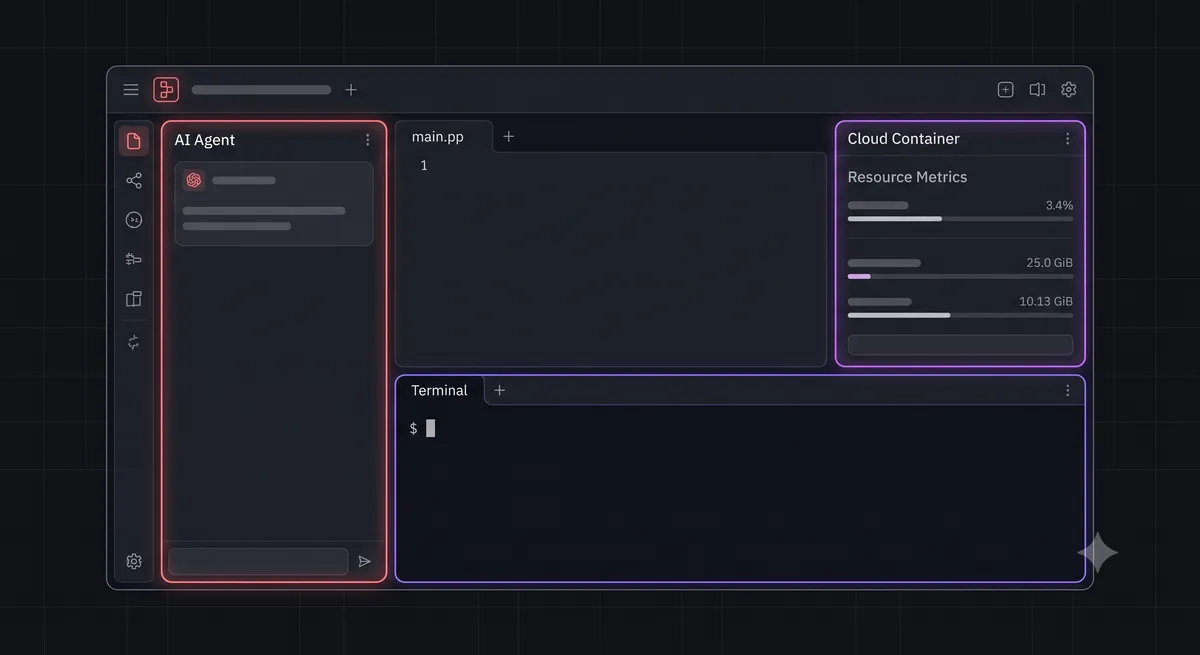
Rather than editing files locally, Replit Core hosts your workspace inside high-performance, virtualized cloud containers called Repls. Each Repl is equipped with an isolated file system, a terminal, and a live web preview panel, allowing you to run, test, and deploy applications instantly without any local configuration.
Key Features of Replit Core
Replit Core stands out due to several unique, cloud-native capabilities:
- High-Performance Cloud Containers:
Replit Core Repls run on upgraded cloud hardware, providing up to 4 vCPUs and 8GB of RAM per container. This ensures that heavy compilation tasks, database migrations, and local test suites execute rapidly.
- Real-Time Multiplayer Collaboration:
Much like Google Docs, Replit Core allows multiple developers to edit the same codebase, share terminals, and debug errors simultaneously in real-time. This makes it the ultimate platform for pair programming and remote team collaboration.
- The Replit AI Agent:
The crown jewel of Replit Core. The Replit Agent is a highly autonomous AI assistant that can build complete applications from scratch. You describe a feature in natural language, and the Agent will write the code, install the required npm/pip packages, configure the database, and deploy the application automatically.
Understanding the AI Agent Credit System
Replit Core utilizes a Credit-Based System to allocate compute resources for its autonomous AI Agent. When you subscribe to Replit Core, you receive a monthly allocation of Agent Credits.
Here is how the credit consumption works in practice:
- Initial Project Setup: Directing the Replit Agent to bootstrap a new project (e.g., configuring a Node.js Express server with a React frontend) consumes roughly 50 credits.
- Feature Iteration: Asking the Agent to add a new feature (like a contact form or a database schema) consumes between 10 and 25 credits depending on the number of files modified.
- Debugging & Self-Correction: If the Agent encounters a compilation error and must run a loop to fix it, each self-correction step consumes 5 to 10 credits.
If you exhaust your monthly credit allocation, you can purchase additional credits directly from the dashboard, or continue using the basic AI autocomplete and chat features (which remain unlimited for Core subscribers).
Performance Benchmarks: Building a SaaS MVP
We put the Replit Core Agent to the test by asking it to build a complete SaaS MVP: a secure, real-time chat application with user channels, direct messaging, and persistent message storage.
Here is how the Agent performed:
- Bootsrapping (Time: 1 minute): The Agent successfully initialized a Node.js backend, configured Socket.io for real-time communication, and set up a clean React frontend using Tailwind CSS.
- Database Integration (Time: 2 minutes): The Agent provisioned a local SQLite database, wrote the schema for users and messages, and implemented the database queries to persist chat history.
- Deployment (Time: 30 seconds): With a single click, the Agent deployed the application to a public Replit URL, making it instantly accessible on our mobile devices.
Total Time to Production: 3 minutes, 50 seconds.
The generated code was clean, well-structured, and fully functional. The real-time websocket connections worked flawlessly on the deployed URL.
Pros & Cons of Replit Core
The Pros
- ✓ Zero local setup required; code, test, and deploy entirely in the cloud.
- ✓ Unmatched real-time collaboration features for remote teams.
- ✓ The Replit Agent is incredibly capable at bootstrapping complete MVPs.
The Cons
- × Requires a continuous, high-speed internet connection to edit code.
- × Cloud container latency can occasionally feel slower than local execution.
- × Agent credit limits can be restrictive for heavy daily prototyping.
The Final Verdict: Is Replit Core Worth It?
In 2026, Replit Core is an exceptional, high-value platform for startup founders, indie hackers, and remote development teams.
If your goal is to build and validate MVPs rapidly, collaborate with remote partners in real-time, and deploy applications instantly without wrestling with local configurations, Replit Core is an indispensable tool that will multiply your output.
However, for traditional software engineers who prefer working locally, have highly customized editor configurations, or work in offline environments, a local editor like Cursor remains the superior choice.
Our Rating: 9.2/10 — Highly Recommended for rapid prototyping.
To compare Replit Core with other terminal-based AI agents, check out our in-depth review of Codex CLI vs Claude Code, or read our guide on VS Code Profiles Setup to optimize your local editor.