Introduction: The Serverless Database Dilemma
In the modern full-stack ecosystem of 2026, Prisma is widely regarded as one of the most powerful and developer-friendly Object-Relational Mappers (ORMs) for Node.js and TypeScript. By providing type-safe database queries, automated migrations, and intuitive schema modeling, Prisma has streamlined how developers interact with relational databases.
However, when developers deploy Prisma-backed applications to serverless environments (like Vercel, AWS Lambda, or Netlify Functions), they frequently run into a major architectural roadblock.
The most common and frustrating error is the **PrismaClientInitializationError**.
Your application works flawlessly on your local machine, but in production, under moderate traffic, the serverless functions abruptly crash, throwing database connection errors, timing out, or exhausting your database's connection pool.
In this comprehensive, production-grade guide, we will analyze why Prisma Client fails to initialize in serverless environments, explore the architectural mismatch between serverless execution and traditional relational databases, and provide a bulletproof, step-by-step solution to configure Prisma for serverless scale.
The Serverless Connection Mismatch
To understand why Prisma Client fails to initialize, we must look at how serverless platforms execute code.
In a traditional, long-running server environment (like a VPS or dedicated Express server), your application initializes once and maintains a persistent, long-lived pool of database connections. When a request comes in, the server borrows a connection from the pool, executes the query, and returns it.
Serverless functions operate on a completely different model.
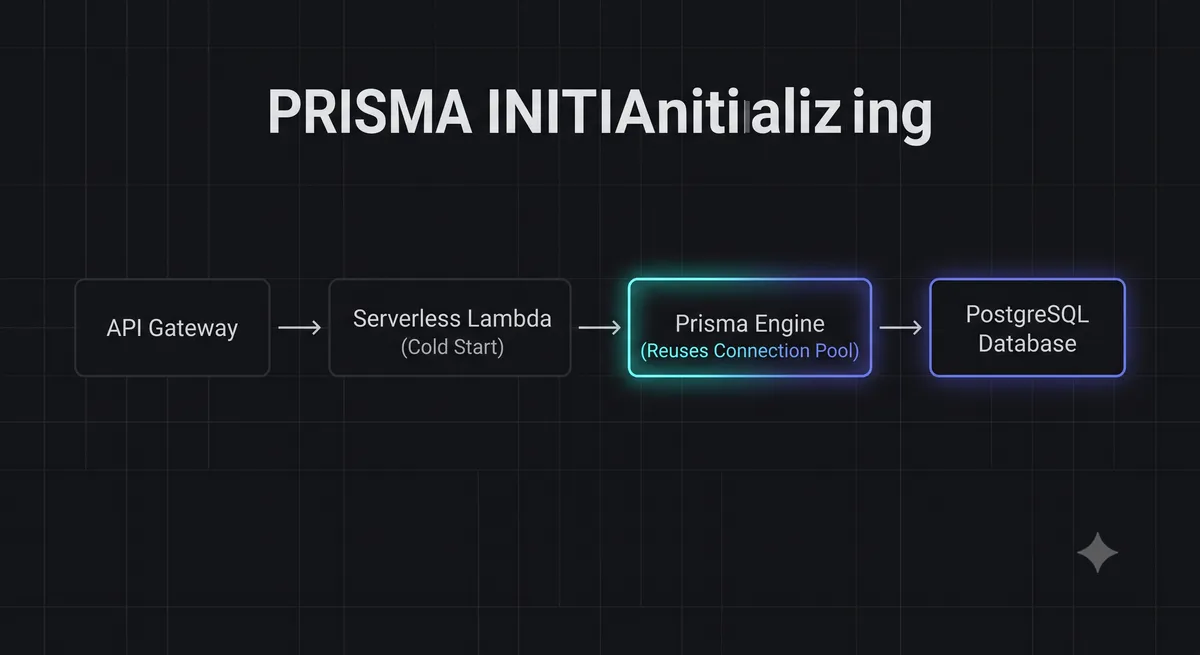
When a request hits a serverless API route, the platform spins up an isolated, ephemeral container (a "cold start") to handle that single request. If 100 users hit your API simultaneously, the platform spins up 100 independent containers in parallel.
If each of those 100 containers initializes its own instance of PrismaClient and opens a database connection pool, they will collectively attempt to open hundreds of concurrent connections to your database. Relational databases (like PostgreSQL or MySQL) have strict, relatively low limits on concurrent connections (often 100 or less on standard cloud tiers).
Once your database's connection limit is reached, new serverless containers will fail to initialize their Prisma clients, throwing the dreaded PrismaClientInitializationError and crashing your application.
Common Error Symptoms & Logs
When Prisma Client fails to initialize in serverless environments, your serverless logs will show one of these three common error messages:
P1001: Can't reach database server:The database server is either offline or refusing connections because its connection queue is completely full.
P1002: The database server was reached but the connection timed out:The serverless container successfully contacted the database, but had to wait too long in the connection queue, causing the serverless function to timeout.
PrismaClientInitializationError: Prisma Client could not initialize:Often caused by the Prisma engine binary failing to load or execute within the read-only file system of a serverless container.
Step-by-Step Solution: Instantiating a Global Prisma Client
To prevent serverless containers from creating redundant Prisma client instances during hot reloads (especially in development or serverless execution), you must implement a Global Singleton Pattern.
This pattern ensures that only a single instance of PrismaClient is created and cached globally, reusing the active database connection pool across subsequent requests.
Create a file at lib/prisma.ts and implement the following singleton configuration:
import { PrismaClient } from '@prisma/client';

const prismaClientSingleton = () => {
  return new PrismaClient({
    log: process.env.NODE_ENV === 'development' ? ['query', 'error', 'warn'] : ['error'],
  });
};

declare const globalThis: {
  prismaGlobal: ReturnType<typeof prismaClientSingleton>;
} & typeof globalThis;

const prisma = globalThis.prismaGlobal ?? prismaClientSingleton();

export default prisma;

if (process.env.NODE_ENV !== 'production') globalThis.prismaGlobal = prisma;
By exporting this cached prisma instance, your serverless routes will reuse the same database connection pool, drastically reducing connection overhead.
Implementing Connection Pooling for Production Scale
While the singleton pattern works perfectly for individual serverless containers, it cannot prevent connection exhaustion when your application scales to dozens of concurrent containers.
To handle production-scale traffic, you must use an external connection pooler.
A connection pooler (like PgBouncer, Supabase Supavisor, or Neon Connection Pooling) sits between your serverless functions and your database. It maintains a stable pool of persistent connections to the database and rapidly routes incoming serverless requests through those active connections, preventing exhaustion.
When configuring Prisma to use a connection pooler, you must update your schema.prisma file to utilize two distinct connection strings:
url(Pooled Connection): Points to the connection pooler port (usually6543or5432withpgbouncer=truequery parameters). Used for executing daily queries.directUrl(Direct Connection): Points directly to the database port (usually5432). Used exclusively for executing migrations, which cannot run through a connection pooler.
Update your prisma/schema.prisma file as follows:
datasource db {
  provider  = "postgresql"
  url       = env("DATABASE_URL")      // Pooled connection string
  directUrl = env("DIRECT_DATABASE_URL") // Direct connection string
}
Advanced Performance Tuning for Serverless Prisma
To optimize Prisma's cold-start speeds and memory footprint in serverless environments, apply these advanced configurations:
- Use Prisma Accelerate: Prisma's official global database cache and connection pooler. It offloads the Prisma query engine binary from your serverless container to a global edge network, reducing cold starts by up to 90%.
- Optimize Connection Pool Limits: Reduce the connection pool size of your Prisma Client instance to prevent individual containers from hogging connections:
DATABASE_URL="postgresql://user:pass@host:6543/db?connection_limit=1" - Generate Prisma Client in Postinstall: Ensure the Prisma Client binary is generated correctly for your target serverless operating system (usually Debian/Linux) during the deployment build phase:
"scripts": {
  "postinstall": "prisma generate"
}
Conclusion: Scale Your Database Predictably
The PrismaClientInitializationError is a classic symptom of the architectural mismatch between stateless serverless execution and stateful relational databases.
By implementing the Global Singleton Pattern, configuring connection pooling with distinct pooled and direct URLs, and optimizing your connection limits, you can build a highly resilient, type-safe database layer that scales smoothly to handle any volume of concurrent traffic.
To test your database's response times and HTTP codes, launch our interactive HTTP Status Lookup Tool, or check out our guide on Vercel Edge Timeout Fixes to optimize your serverless API routes.